
FindUpApp
Free platform to submit and discover iOS and Android appsSubmit an app, find apps worth trying.
Highlights
What you can do with it
- A developer submits a fitness app to gain exposure
- A user finds a game app they would not have found in a store search
- A team finds a management app that fits how they already work
How to use it
- 1 Open the FindUpApp site
- 2 Developers click Submit App and paste the store URL
- 3 Users browse by category or filter the results
- 4 Open an app detail page to read the description and release details
- 5 Decide whether to download based on what the listing says
Who it is for
Pros
- Submission is free and only needs a store link
- Category and filter browsing makes a long list quick to narrow
- Detail pages give enough context before you install anything
Limitations
- Exposure depends on how the platform surfaces your listing
- Listing is free, so there is no promise of downloads or traffic
- Submission rules and free access can change at any time
What FindUpApp is
FindUpApp is a free directory where developers list apps and users look for things to try. Submission is straightforward: paste the App Store or Google Play URL and the app appears on the platform for display. For developers the point is exposure without a marketing budget. For users the point is finding apps that are hard to surface in a crowded store search, including smaller tools and games. The platform covers categories such as games, art and entertainment, and social networking, and each listing carries a short description, a release date, and a category. Browsing can be filtered by release time, price, and category. The whole thing is free to use.
What you can do with it
- Submit an iOS or Android app using only a store URL
- Browse by category when you do not know what you are looking for
- Filter by release date, price, or category to narrow a long list
- Read a listing description and release details before installing
Who it is for
- Developers who want a free extra channel for an app
- App enthusiasts who enjoy digging for lesser known tools
- Enterprise users looking for software that fits an internal workflow
What to watch out for
Listing an app is not the same as promoting it. The platform gives you a page, and whether anyone sees it depends on how the site surfaces listings. The directory makes no promises about download numbers, so treat it as one channel among several rather than a growth plan. Anyone can submit, which means quality varies, and you should read the detail page rather than trusting a category label. It is also a directory rather than a store, so the actual install still happens on the App Store or Google Play. Free access and submission rules can change at any time.
FAQ
Does submission cost anything?
No. The listing describes free app submission for both iOS and Android apps.
What do I need to submit an app?
The App Store or Google Play URL is all that is required.
Can I filter by price or release date?
Yes, filtering by release time, price, and category is listed.
Why it is free
What the official page says: for freefree to use
Free limits, trial length and features are decided by the official site and can change at any time.
Product preview
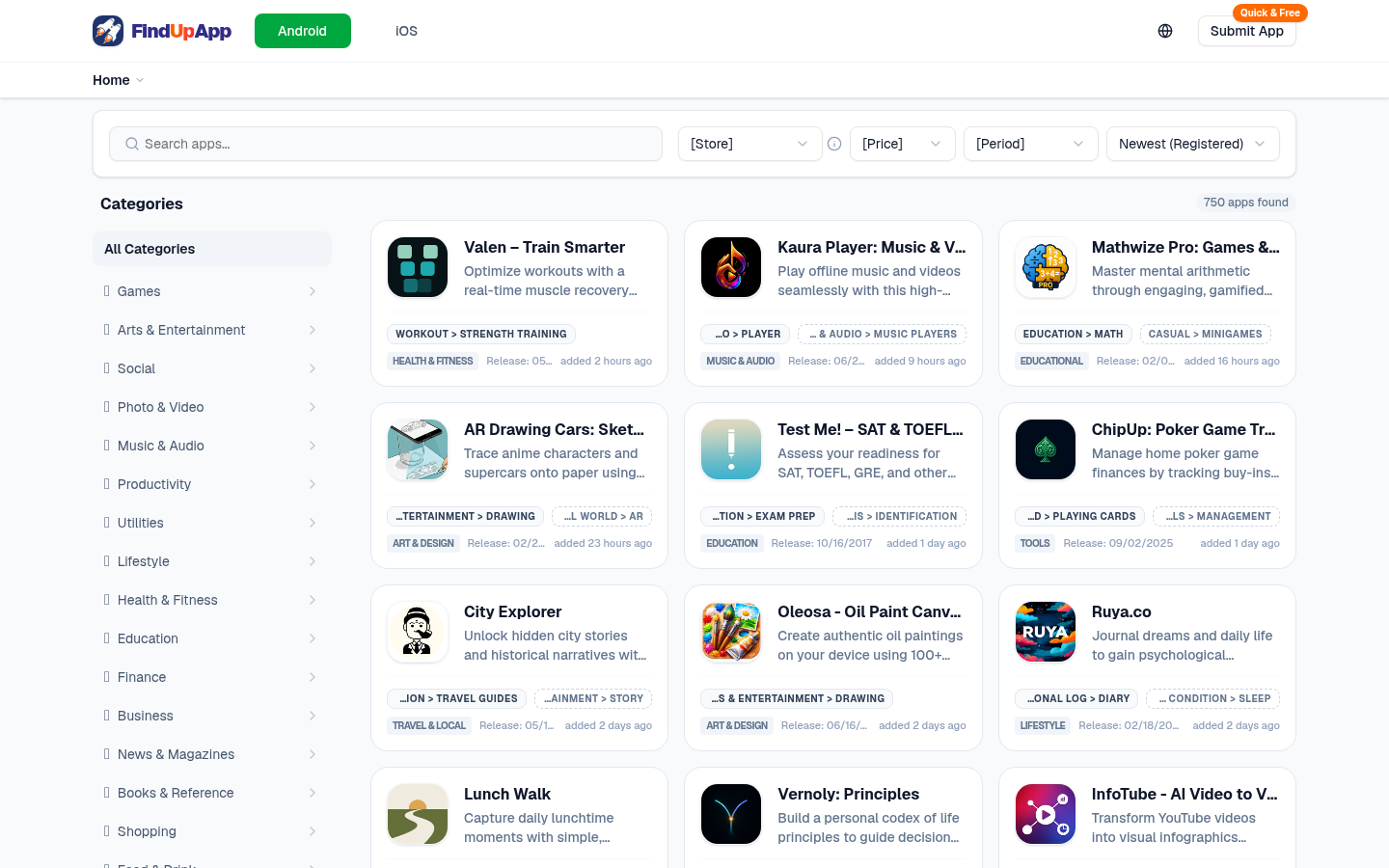
Screenshot archived from the listing page, for preview only.











