
Liner.ai
Free no-code machine learning toolTrain a model without code
Highlights
What you can do with it
- A developer adding a simple classifier to an app
- A product builder testing an ML feature without a data scientist
- A student experimenting with their own dataset
How to use it
- 1 Import your data into Liner
- 2 Review the data in the tool
- 3 Train the model with one click
- 4 Export the model and integrate it into your application
Who it is for
Pros
- Free with no coding required
- One-click training keeps setup minimal
- Exportable model you can integrate yourself
- Good for fast experiments
Limitations
- Free scope and limits are not detailed, so they may change
- Model quality depends entirely on your training data
- Not a substitute for custom ML work on hard problems
- Little control over training internals
What Liner.ai is
Liner.ai is a free tool for building and deploying machine learning applications without writing code. The claim is that you can go from data to a usable model in minutes, and that no machine learning expertise is required. The flow is short: import your training data, look at it inside the tool, train with one click, then export the model and integrate it with your own application. It is aimed at developers and product builders who need a working model quickly and do not want to assemble a training pipeline from scratch.
What you can do with it
- Import training data and inspect it in the tool.
- Train a model with one click.
- Export the model for use in your own application.
- Test an ML feature without hiring a data scientist.
Who it is for
- Developers who have no machine learning background.
- Product builders validating an ML idea quickly.
- Students and hobbyists experimenting with their own data.
What to watch out for
The tool removes the coding step, not the data step. Model quality depends almost entirely on the training data you bring, and messy or unbalanced data produces a weak model no matter how simple the interface is. Because it is a simplified, one-click flow, you get limited control over training internals, which matters as soon as your problem gets specific. The page presents it as free but does not detail limits, so treat capacity as changeable. For anything mission critical, plan to validate the exported model on your own test set before it touches real users. Start with a small sample to confirm the output meets your expectations before processing the full batch.
FAQ
Is Liner.ai free?
Yes, the site describes it as a free tool.
Do I need to know machine learning?
No, it is built for people without machine learning expertise.
Can I use the model in my own app?
Yes, you export the model and integrate it with your application.
Why it is free
What the official page says: 免费
Free limits, trial length and features are decided by the official site and can change at any time.
Product preview
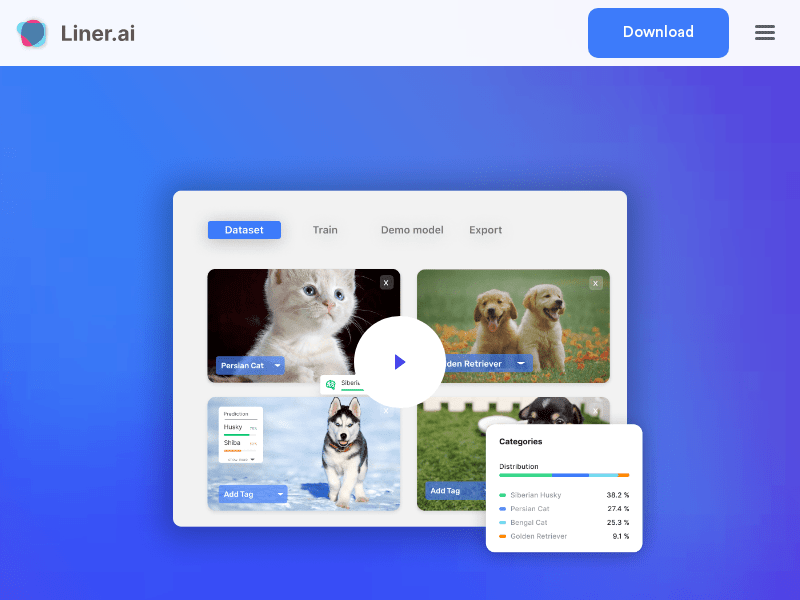
Screenshot archived from the listing page, for preview only.











