
local.ai
Run AI models locally on your own PCFree open source desktop playground for local models
Highlights
What you can do with it
- Try out an AI model offline without sending prompts to a remote server
- Keep sensitive documents and prompts on your own hardware
- Manage a local model library with download and integrity checks in one client
How to use it
- 1 Download and install the local.ai desktop client.
- 2 Open the model manager and download the model you want to test.
- 3 Let the app verify the integrity of the downloaded files.
- 4 Start an inference session and load the model into the playground.
- 5 Adjust settings and run further tests locally as needed.
Who it is for
Pros
- No GPU purchase needed for basic local inference
- Offline operation supports privacy sensitive work
- Model management and integrity checks are built into the client
- Free and open source, so you can inspect and modify it
Limitations
- CPU inference is slower than GPU inference, especially on large models
- Model compatibility and output quality vary by model and hardware
- The project is under active development, so minor issues can appear
- Free and open source status does not guarantee long term maintenance
What local.ai is
local.ai is a desktop client for managing, validating and running AI models on your own computer. It is described as a zero setup AI experimentation environment, which means you install the app, download a model and start testing without assembling a toolchain. The important detail is that no GPU is required: inference runs on the CPU, so a standard laptop or desktop is enough to get started. Because everything happens locally and offline, prompts and files stay on your machine, which is the main privacy argument for this kind of tool. The application is free and open source.
What you can do with it
- Download models and keep a local library organized inside one client.
- Verify the integrity of model files before you load them.
- Run inference locally on CPU without a GPU.
- Experiment with models in an offline setup where data does not leave the device.
Who it is for
- Privacy conscious users who do not want prompts sent to a remote service.
- Developers and hobbyists who have no dedicated GPU but still want local models.
- Learners who prefer a graphical client over command line scripts.
What to watch out for
CPU inference is convenient but slow, so large models can take a long time to respond and very large ones may be impractical on modest hardware. Model support and output quality differ from model to model, and not every model you find online will work smoothly here. The project is under active development, which means features and interfaces can change between versions. As with any open source tool, free access today does not promise long term maintenance, so keep backups of models and configs you rely on.
FAQ
Do I need a GPU to use local.ai?
No. The app is built around CPU inference, so it runs without GPU support.
Is local.ai free?
Yes. It is described as a free and open source desktop client.
Does it work without an internet connection?
It is designed for offline, local use once models are downloaded, which helps with privacy.
What does model integrity verification do?
It checks downloaded model files so you can be more confident they are complete and unchanged before running them.
Why it is free
What the official page says: 免费
Free limits, trial length and features are decided by the official site and can change at any time.
Product preview
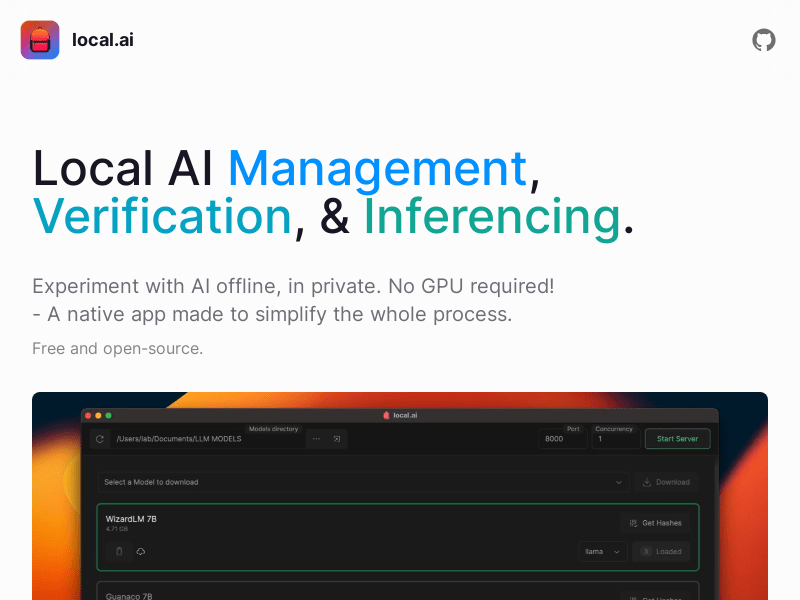
Screenshot archived from the listing page, for preview only.











