
PhotoEditor AI
Free AI photo editorEdit photos with text prompts, no signup
Highlights
What you can do with it
- A candle shop owner replacing a cluttered background and improving lighting on a product photo
- An e-commerce manager removing distractions and unifying backgrounds across a set of promotion photos
- A social media manager refreshing outdated backgrounds and dim lighting in older content
- A freelance designer removing distractions from a lifestyle photo without touching the subject
How to use it
- 1 Open the Photo Editor AI site; no registration is needed to reach the editor
- 2 Upload an image by drag and drop, click, or paste, in JPG, JPEG, PNG, or WebP up to 24MB
- 3 Describe the edit you want, such as removing an object or replacing the background
- 4 Set the aspect ratio and the number of samples to generate
- 5 Generate, then compare versions in the results area or image history
- 6 Regenerate if needed, then download the HD watermark-free result
Who it is for
Pros
- The editing interface is reachable without creating an account
- One prompt can replace several manual editing steps
- Reference blending gives you control over colour, material, and style
- Local edits are designed to preserve faces and composition
Limitations
- Only a free trial quota is confirmed, and paid limits can change; the listing does not state pricing
- Prompt editing is less precise than manual selection for detailed retouching
- Uploads go to a third-party service, so sensitive images need a privacy check first
- Output varies between samples, so expect to generate more than once
What PhotoEditor AI is
Photo Editor AI is a generative AI photo editing tool that runs in the browser. You upload an image, describe the change you want in ordinary language, and the system carries it out. The kinds of edit it handles are the ones that usually force people into a full editor: replacing a background, removing an object, changing clothing, adjusting colour and lighting, and refining texture. There is no software to install and no account needed to reach the editing interface. Files go in by drag and drop, click, or paste, in JPG, JPEG, PNG, or WebP format up to 24MB. You can also upload a reference image and blend its colours, materials, lighting, or visual style into the original. When the edit is local, the tool is designed to preserve faces, subject detail, proportions, and overall composition so the result still looks like your photo. Output is described as HD and watermark free, with a free trial quota for trying it.
What you can do with it
- Replace a background or remove an unwanted object with a written instruction
- Change clothing, colour, lighting, and texture without manual selection work
- Blend a reference image to pull across a colour palette, material, or style
- Keep faces, proportions, and composition stable during local edits
- Compare generated versions in image history and regenerate as needed
Who it is for
- E-commerce sellers and small brands cleaning up casually shot product photos
- Operations and catalogue managers unifying backgrounds across large image sets
- Social media and content marketers refreshing outdated or inconsistent assets
- Freelance and brand designers working from client reference images
- Everyday users who want a quick edit without installing or learning software
What to watch out for
The confirmed entry point is a free trial quota, and the listing does not state pricing or what happens when it runs out. Those limits can change, so check the current page before you plan a batch of edits around it. Prompt editing is fast but coarse: for detailed retouching, a manual editor still gives more control. Uploading photographs of people, products, or client material means sending those files to a third-party service, so read the privacy policy before you upload anything sensitive. Output also varies between samples, so generate more than once and compare. Treat results as drafts that need a look at full size before you publish.
FAQ
Do I need an account to edit photos?
No. The listing says the online editing interface is reachable without registration.
What can I change with a prompt?
Backgrounds, objects, clothing, colour, lighting, and texture, plus blending from a reference image.
What files and sizes are supported?
JPG, JPEG, PNG, and WebP, up to 24MB per image.
Are the results free of watermarks?
The page describes the downloadable results as HD and watermark free, within the free trial quota.
Why it is free
What the official page says: no registrationfree trial
Free limits, trial length and features are decided by the official site and can change at any time.
Product preview
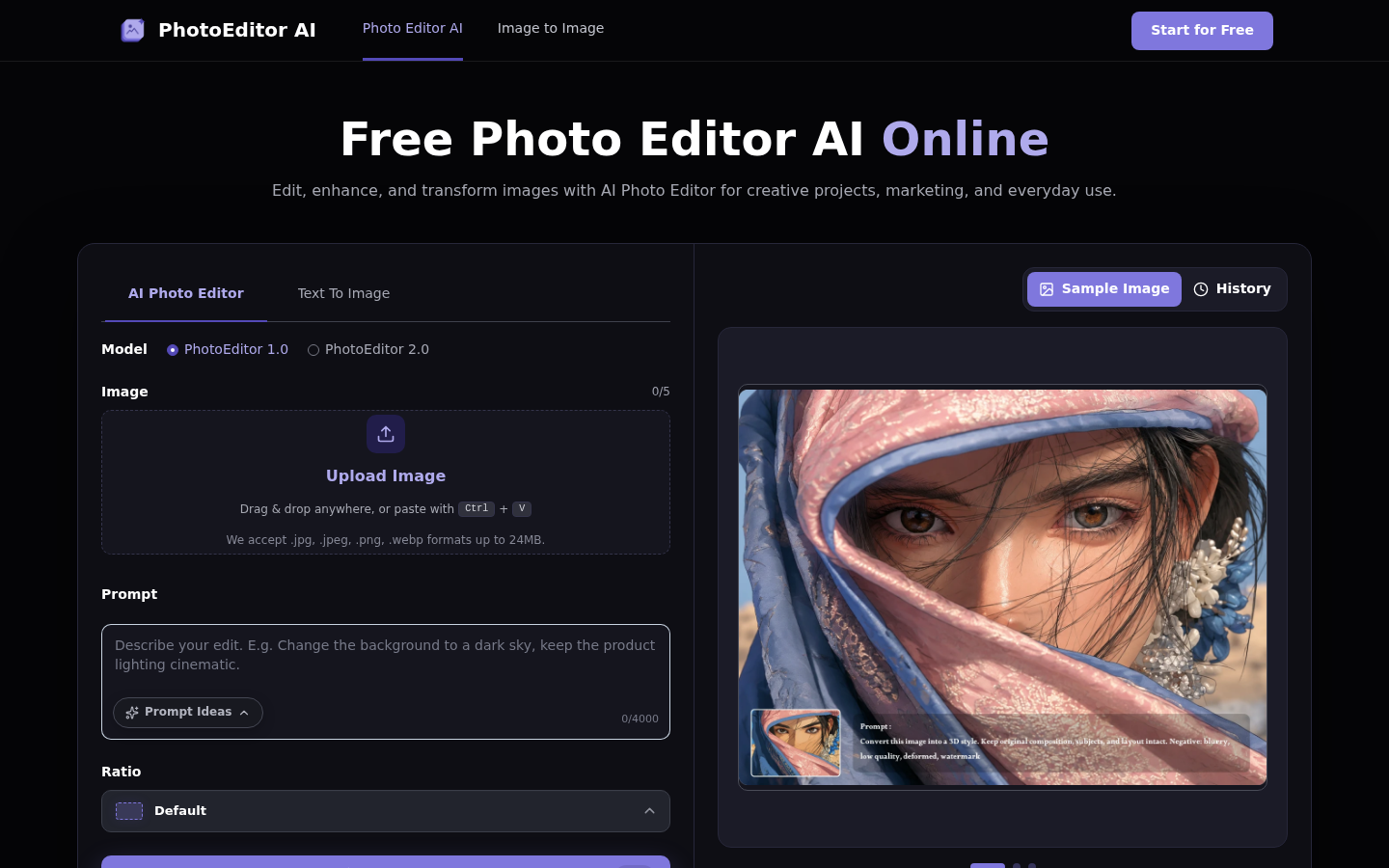
Screenshot archived from the listing page, for preview only.











