
Pica AI
AI art generator from textTurn text descriptions into AI art
Highlights
What you can do with it
- Generate AI paintings and illustrations from a written description
- Create avatars and images for personal or creative projects
- Refine output with custom images and negative descriptions
How to use it
- 1 Open the Pica AI website in your browser.
- 2 Enter a description of the art you want to create.
- 3 Choose the ratio, quantity, and style you prefer.
- 4 Use advanced settings such as custom images or negative descriptions if needed.
- 5 Generate the images and download the results you like.
Who it is for
Pros
- Free access lowers the barrier to trying AI art
- Fast generation, with results described as taking seconds
- Flexible controls over ratio, quantity, style, and prompts
Limitations
- Free access terms can change over time
- Result quality depends heavily on how you write prompts
- Focused on art and avatar generation, not full design work
What Pica AI is
Pica AI is an AI art generator that creates art, illustrations, images, and avatars from text descriptions. The site says it can produce results within seconds, and it currently offers free access so anyone can try AI art without paying. You describe what you want, and the tool generates images based on that description. It is aimed at people who want quick creative visuals without professional design skills. Free access is the current offer, and terms like this can change, so it is worth checking the site before you depend on them.
What you can do with it
- Generate AI paintings and illustrations from written descriptions
- Create images in different ratios and quantities in a single run
- Choose from style options and adjust advanced settings
- Use custom images and negative descriptions to steer the output
Who it is for
- Hobbyists and beginners who want to experiment with AI art
- Creators who need quick illustrations, images, or avatars
- Students and educators making visuals for projects and lessons
What to watch out for
Result quality depends heavily on how you write your prompts, so expect some trial and error before the output matches your idea. The free access offer can change at any time, and the tool is focused on art and avatar generation rather than full graphic design work. Treat generated images as drafts, review them carefully, and make sure you have the right to use any custom images you upload before sharing results publicly. For best results, start with a small test file and review the output carefully before working on anything important. Free tiers can change over time, so it is worth checking the current limits on the official page before you rely on the tool daily.
FAQ
Is Pica AI free to use?
The site says it offers free access, so you can try AI art generation without paying. Free rules can change, so check the site for current terms.
What can I create with Pica AI?
You can generate AI art, illustrations, images, and avatars based on text descriptions you write.
Can I control the output?
Yes. You can set ratios and quantities, pick styles, and use advanced settings such as custom images and negative descriptions.
Why it is free
What the official page says: 免费使用免费
Free limits, trial length and features are decided by the official site and can change at any time.
Product preview
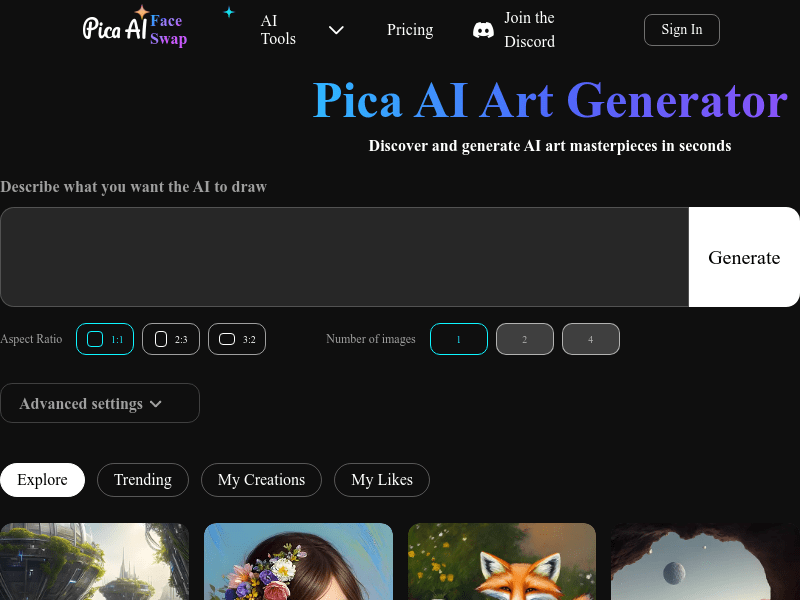
Screenshot archived from the listing page, for preview only.











