
SoWork
Virtual office for remote teamsA smart virtual office for remote work
Highlights
What you can do with it
- Hold video calls with your remote team
- Share your screen in public or private meetings
- Get automatic meeting summaries after calls
How to use it
- 1 Visit the SoWork website
- 2 Create a free office and set up your avatar
- 3 Customize your workspace
- 4 Start video calls and chat with your team
Who it is for
Pros
- Free office to get started
- Combines video, chat, and summaries
- Customizable and connected workspace
Limitations
- Free office terms and features can change over time
- Needs a stable internet connection for video
- A virtual space may not suit every team's style
What SoWork is
SoWork is an intelligent virtual office built for remote teams, and you can create a free office to get started. You make your own virtual avatar and step into a customizable workspace where you can hold video calls, communicate with team members, and get work done. It aims to provide a seamless, efficient, and connected work environment for teams that do not share a physical office. The focus is on natural, connected collaboration rather than plain chat.
What you can do with it
- Create a free office and a custom avatar
- Hold HD video calls with recording and screen sharing
- Run public or private meetings
- Get intelligent meeting summaries and team insights
Who it is for
- Remote teams that need a shared space
- Distributed teams running regular video calls
- Managers who want summaries and team insights
What to watch out for
You can create a free office, but free terms and features can change over time. Video features need a stable internet connection to work well. A virtual office style may not suit every team, so it helps to try it before relying on it. Some advanced tools may sit behind paid plans. Features and interface details may change between versions, so review the latest notes on the page before you start. For team use, agree on naming and editing conventions in advance to avoid version conflicts or duplicated work. Run one full task end to end first, then expand once you are comfortable with the workflow and the result quality. Behavior may vary across browsers and devices, so test before production use and consult the help docs if errors appear.
FAQ
Is SoWork free?
You can create a free office to get started.
What is it for?
It is an intelligent virtual office for remote teams to meet, chat, and work together.
What features does it have?
It offers HD video and recording, screen sharing, meeting summaries, and office customization.
Why it is free
What the official page says: 免费
Free limits, trial length and features are decided by the official site and can change at any time.
Product preview
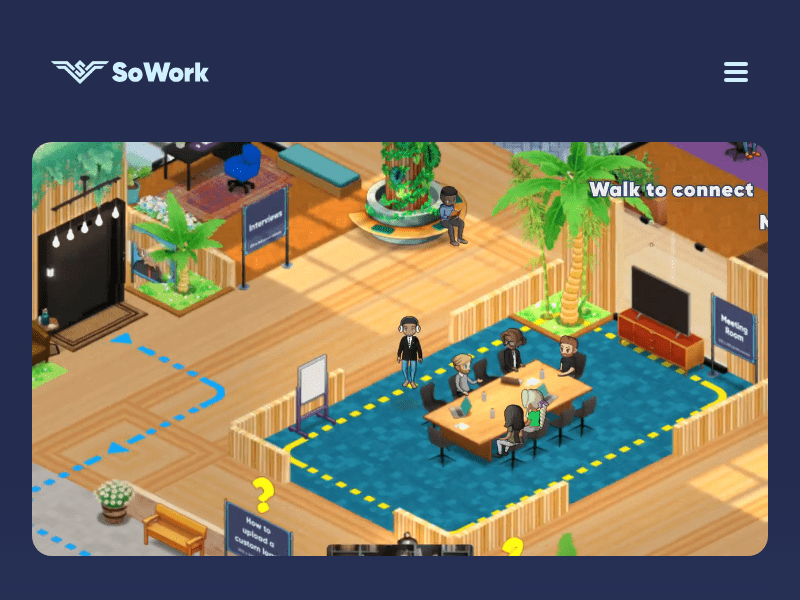
Screenshot archived from the listing page, for preview only.











