Wikis.ai
Ask many AI models at once, compare answersOne question, side-by-side answers from top models
Highlights
What you can do with it
- Cross-check a fact by comparing how different models answer it
- Study a technical topic through the AI Wiki, then follow up with one model
- Gather several models' phrasing and viewpoints to deepen a piece of writing
How to use it
- 1 Open wikis.ai and start for free without a credit card, or sign up for a plan.
- 2 Type your question and pick the models you want to compare from the directory.
- 3 Read each model's independent answer and note where they agree or diverge.
- 4 Click any reply to keep talking to that model, or read the AI Wiki guide first.
- 5 Turn on web search for fresh information, then share a link or export the result.
Who it is for
Pros
- Compares many models at once instead of relying on a single chatbot
- Free tier available to try the workflow without a card
- One subscription can cover many models without separate accounts
Limitations
- Free tier is limited, and the free prompt quota may change over time
- Comparing several long answers takes more reading than a single reply
- Agreement across models is a guide, not proof; they can still be wrong together
What Wikis.ai is
Wikis.ai is a multi-model research platform built on the idea of one question, many answers. Instead of asking a single chatbot, you enter a question and the platform sends it to many top models at the same time, then shows their replies side by side in a grid. The site describes this as a way to spot agreement and disagreement across models, so you can judge reliability rather than relying on one perspective. It runs on a freemium model: there is a free tier, and paid subscriptions add more prompts and fold many models into one plan. It also adds editor-curated AI Wiki guides, web search, searchable history, link sharing, and export to Markdown or PNG.
What you can do with it
- Ask up to eight models at once and read their answers side by side.
- Compare where models agree and where they differ before trusting a reply.
- Read AI Wiki guides on complex topics, then follow up with one model.
- Turn on web search for current information and export or share results.
Who it is for
- Researchers and students who need to cross-check facts.
- Learners working through complex technical subjects.
- Writers and analysts who want several viewpoints on one question.
What to watch out for
The free tier is capped, and the monthly prompt allowance can change, so treat the current limits as a snapshot rather than a fixed promise. Reading several long answers takes more effort than a single reply, and where models agree it is still not proof, since they can share the same blind spots. Because it draws on external models and web search, results also depend on those upstream services staying available and accurate.
FAQ
Which models can I use?
The site lists 30+ models including GPT, Claude, Gemini, DeepSeek, Kimi, and Qwen, with up to 8 compared side by side.
Is there a free option?
Yes, there is a free tier with a monthly prompt allowance, and paid plans add more quota.
How does it help with reliability?
It shows where models agree and where they diverge, so you can weigh answers instead of trusting one source.
Why it is free
What the official page says: freemiumfree tier
Free limits, trial length and features are decided by the official site and can change at any time.
Product preview
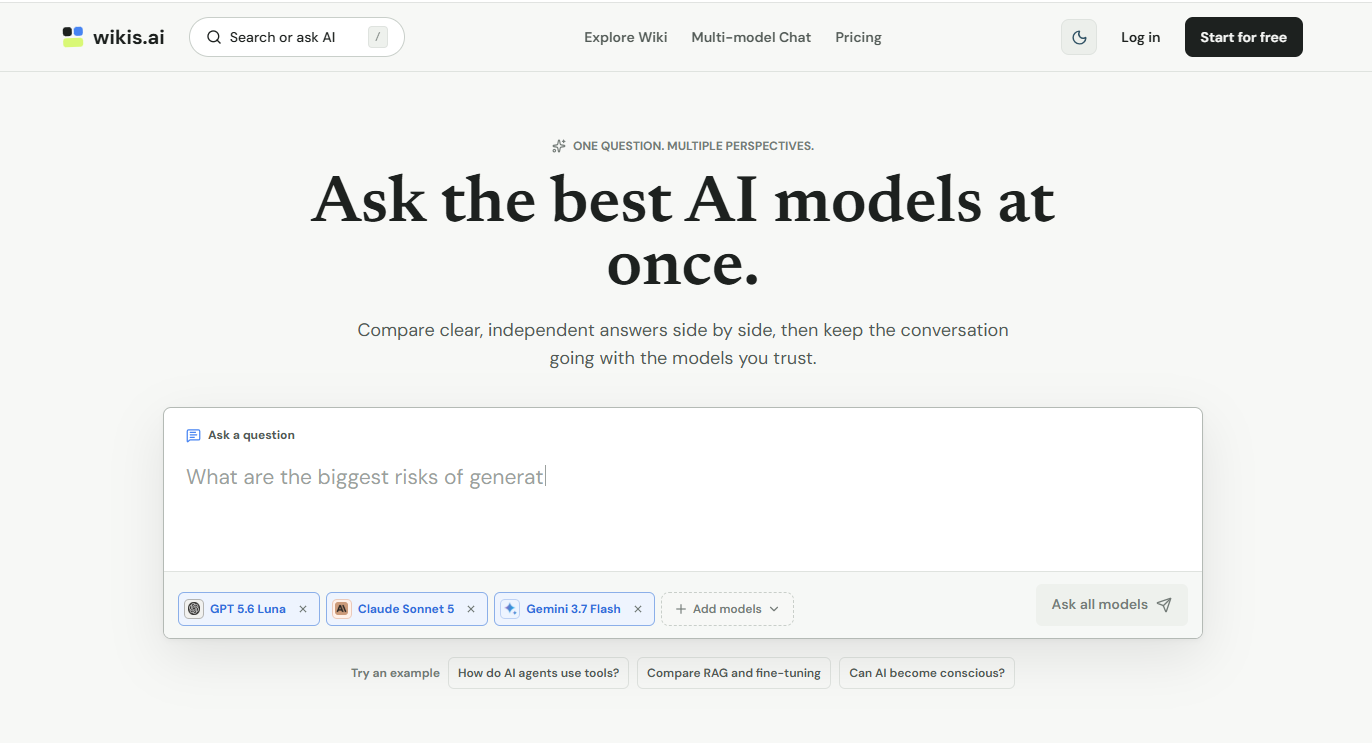
Screenshot archived from the listing page, for preview only.