Yinzi AI
Free online vocal and accompaniment separatorSplit any song into vocals and backing track
Highlights
What you can do with it
- Split a track for mixing and mastering work
- Strip vocals from a video to keep the music
- Build instrumental versions for DJ sets
How to use it
- 1 Upload or drag an audio or video file onto the page.
- 2 Choose whether to extract vocals or accompaniment.
- 3 Wait for the processing to finish.
- 4 Preview the separated files.
- 5 Download the vocal and accompaniment tracks.
Who it is for
Pros
- Free online separation with no install
- Accepts video as well as audio input
- Generous file limits at 15 minutes and 1 GB
Limitations
- Separation is never perfect, artifacts remain
- Uploading files means trusting a third-party service
- Extra tools may carry their own limits or terms
What Yinzi AI is
Yinzi AI is an online audio track separation service. You upload a file, choose what you want pulled out, and it returns the vocal and accompaniment parts separately. The site describes it as based on artificial intelligence and focused on efficient extraction.
Input is flexible. Common audio and video formats are accepted, with a stated maximum of 15 minutes and 1 GB per file. Around that core it bundles a small toolbox: AI image upscaling, text to speech, watermark-free short video downloads, copywriting extraction, and AI voice replacement. The site presents the separation as free, and the page was responding normally at the last check.
What you can do with it
- Separate vocals from accompaniment in an uploaded file.
- Feed a video in and get audio stems back.
- Extract an instrumental for a remix or DJ set.
- Use the side tools for upscaling, speech, or video work.
- Download the separated tracks for further editing.
Who it is for
It suits music producers working on remixes and mastering, video creators who need only the music bed from a clip, and DJs building instrumental versions for sets. Hobbyists making karaoke or practice tracks will find the workflow quick. Anyone releasing commercial material should be careful, since separated stems still carry the original recording's rights.
What to watch out for
Separation is never clean. Bleed between vocals and backing remains, and busy or heavily processed mixes separate worse than sparse ones. Uploading your files means trusting a third-party service with your audio, so avoid sending anything confidential. The bundled extra tools may have their own limits, and the voice replacement feature should never be used to imitate someone without permission.
FAQ
What does Yinzi AI do?
It separates the vocal and accompaniment parts of an uploaded audio or video file so you can download them independently.
What are the file limits?
The site states a maximum duration of 15 minutes and a size of 1 GB.
Is it free?
The site presents it as an online free vocal and accompaniment separator.
What else is included?
AI image upscaling, text to speech, watermark-free short video downloads, copywriting extraction, and AI voice replacement.
Why it is free
What the official page says: 免费
Free limits, trial length and features are decided by the official site and can change at any time.
Product preview
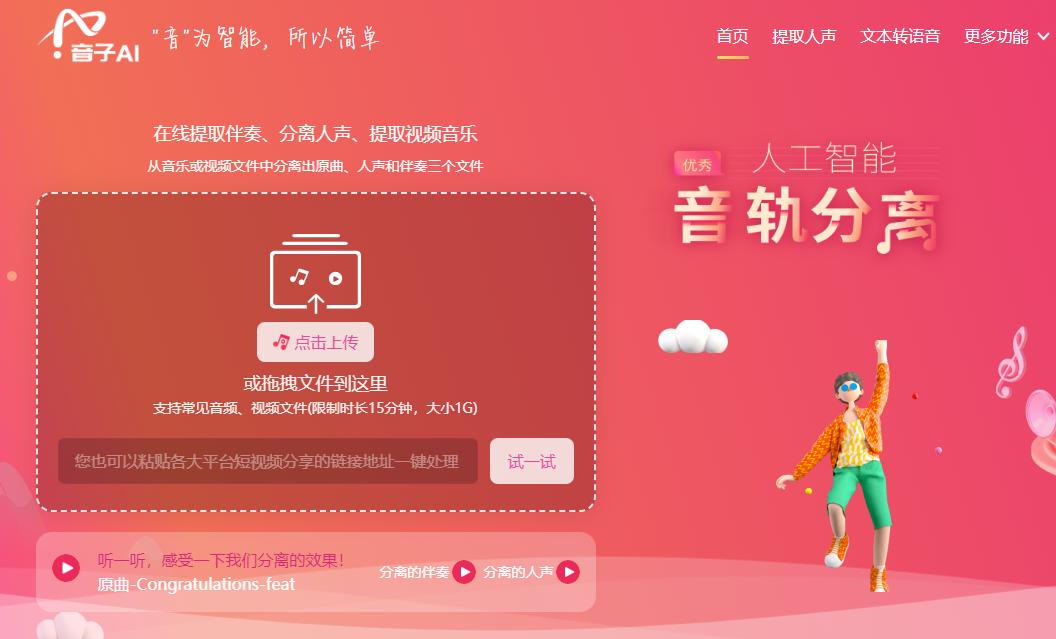
Screenshot archived from the listing page, for preview only.










