
Chatness
AI chatbot service toolTrain bots, collaborate, track data
Highlights
What you can do with it
- Run a support bot on a website that answers common questions
- Let a team maintain the same bot without stepping on each other
- Track what customers ask so you can improve the answers
How to use it
- 1 Open chatness.app and start the free trial
- 2 Create a robot and configure how it should answer
- 3 Use the automated training service to feed it your content
- 4 Invite teammates to collaborate on the bot
- 5 Watch the analysis dashboard and adjust the answers over time
Who it is for
Pros
- Training and collaboration are included rather than added on
- Analysis and tracking help you see where the bot fails
- A 30-day money-back guarantee lowers the risk of trying it
Limitations
- The free trial is a trial, and paid pricing is not in the listing and can change
- Answer quality depends on the material you train it with, so setup work is real
- The listing does not name supported channels or languages, so check scope before you rely on it
What Chatness is
Chatness is an AI chatbot service tool. You create a customisable robot, train it with your own material through an automated service, and put it in front of visitors on your site or inside your product. The listing describes it as high performance and secure, and it includes team collaboration so more than one person can work on the same bot without clashing. Alongside the bot itself there is data analysis and tracking, which is the part that matters after launch, because it shows you what people are actually asking and where the answers fall short. The site advertises 24/7 support, a 30-day money-back guarantee, and a free trial to start.
What you can do with it
- Build and configure a chatbot for your own site or product
- Train the bot automatically with your existing content
- Let teammates collaborate on the same robot
- Track conversations and analyse how the bot performs
- Improve the answer set based on what the data shows
Who it is for
- Small teams that would rather use a managed service than self-host
- Support leads who want common questions handled automatically
- Product owners adding chat to an existing site
- Anyone who wants conversation data to guide FAQ and content updates
What to watch out for
The free trial is a trial, and the listing does not state what a paid plan costs or what the trial includes, so confirm both on the site before you commit, and expect the terms to change. Setup work is real: answer quality depends on the material you train the bot with, and thin or messy content produces thin answers, so budget time for curating it. The listing also does not name the supported channels, languages, or integrations, which matters if you need the bot on a specific platform or in more than one language. Check that scope first, then start the trial.
FAQ
Is there a free trial?
Yes. The site advertises a free trial, and the listing also mentions a 30-day money-back guarantee.
Can a team work on one bot?
Yes. Team collaboration is listed as a feature.
How do I know if the bot is working?
The tool includes data analysis and tracking so you can review conversations and adjust the answers.
Why it is free
What the official page says: 免费试用免费
Free limits, trial length and features are decided by the official site and can change at any time.
Product preview
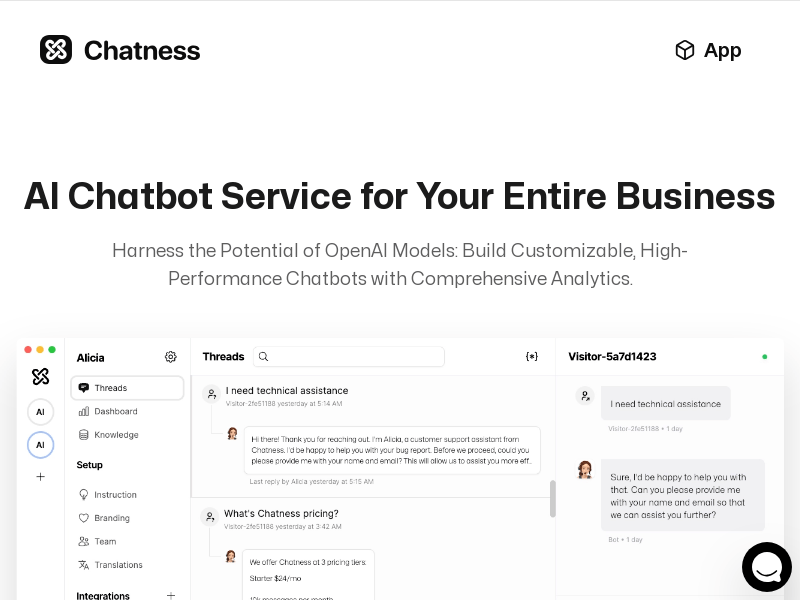
Screenshot archived from the listing page, for preview only.











