
docup.ai
AI chatbot trained on your contentCustomer answers before they ask
Highlights
What you can do with it
- Answer common customer questions automatically on a website
- Reduce repetitive support tickets with self-serve answers
- Bring AI answers into existing support and docs tools
How to use it
- 1 Start the free trial, no credit card required
- 2 Add your content such as URLs, sitemaps, text, and FAQs
- 3 Embed the chat widget or connect your support tools
- 4 Let the AI answer questions and route the rest to humans
Who it is for
Pros
- Free trial with no credit card required
- 30-day money-back policy
- Works as a widget or inside your own support flow
Limitations
- Answer quality depends on the content you provide
- Setup and content curation take real effort
- Trial and pricing terms may change
What docup.ai is
docup.ai is an AI tool for optimizing support processes. You feed it your own content, including URLs, sitemaps, plain text, and FAQs, and it learns to answer the questions your customers actually ask. The goal is to make better use of the content you already have instead of writing new documentation from scratch. Answers can be delivered through a chat widget embedded on your website, or integrated into the support and documentation tools you already use. When a question goes beyond what the AI knows, the customer is guided toward ways to contact you directly. The service offers a free trial with no credit card required, plus a 30-day money-back policy.
What you can do with it
- Train the AI on URLs, sitemaps, plain text, and FAQs
- Embed a chat widget that answers customers in real time
- Hand off to human contact when the AI cannot help
- Plug AI answers into your existing support and docs workflow
Who it is for
- Support teams answering the same questions over and over
- Website owners who want self-serve answers for visitors
- Product and SaaS teams with large help content libraries
What to watch out for
Answer quality depends almost entirely on the content you provide, so thin or outdated documents produce weak answers. Setup takes real effort: you need to curate the material the AI learns from and keep it current. The free trial is an easy way to test fit, but trial terms and pricing may change, so confirm details before you commit. Treat AI answers as a first line of support, not a replacement for humans on sensitive issues. Keep an eye on how customers phrase questions, because gaps in your content show up quickly once real traffic arrives.
FAQ
What can I train docup.ai on?
URLs, sitemaps, plain text, and FAQs.
How do customers get answers?
Through an embedded chat widget or your own support integration.
What if the AI cannot answer?
The customer is guided to ways to contact you directly.
Is there a free trial?
Yes, with no credit card required and a 30-day money-back policy.
Why it is free
What the official page says: free trialno credit card
Free limits, trial length and features are decided by the official site and can change at any time.
Product preview
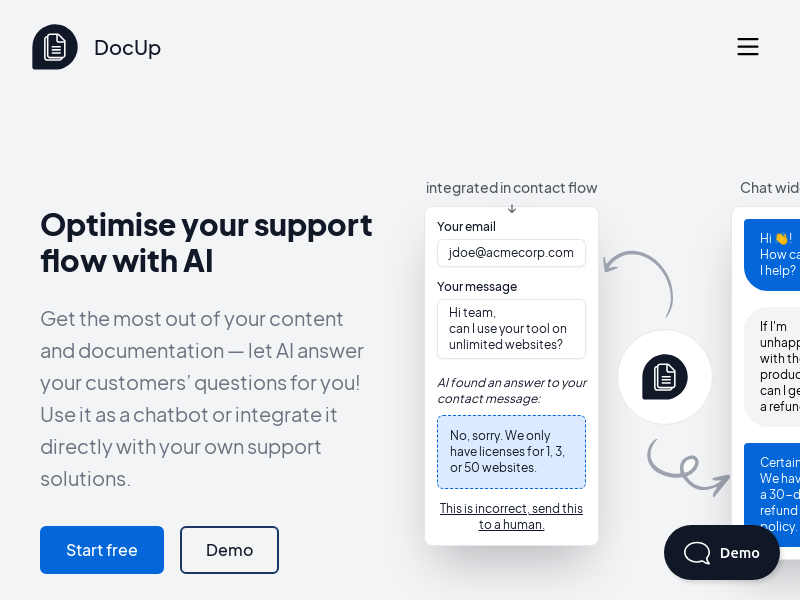
Screenshot archived from the listing page, for preview only.











