
EzMail.AI Extension
Free AI helper for GmailWrite Gmail emails with ChatGPT
Highlights
What you can do with it
- Draft a full business email from a short instruction
- Get template suggestions for common replies
- Finish sentences faster while typing in Gmail
How to use it
- 1 Open the Chrome extension page for EzMail.AI
- 2 Add the extension to Chrome
- 3 Open Gmail and start a new message
- 4 Use the extension to generate, autocomplete, or reply
- 5 Edit the result and send
Who it is for
Pros
- Completely free according to the site
- No need to leave Gmail to draft
- Autocomplete, templates, and smart replies
- Works for personal and business email
Limitations
- A free extension can change terms or add a paid tier later
- Chrome and Gmail only, so other clients are not covered
- Generated email still needs a human check before sending
- Quality depends on the instruction you give it
What EzMail.AI Extension is
EzMail.AI is a free Chrome extension that brings ChatGPT into Gmail. It can generate entire emails and messages, and it adds three helpers around that: sentence autocomplete while you type, email template recommendations, and smart reply suggestions. Because it lives inside Gmail, you draft and answer without copying text into another site or opening a second tab. The site says the tool is built for both personal and business use, that it saves time, and that it boosts work efficiency. It describes the plugin as completely free, with no paid tier mentioned in the material we have, so the whole pitch rests on making everyday email faster.
What you can do with it
- Generate a complete email from a short instruction
- Get template recommendations for common replies
- Let the extension autocomplete sentences as you type
- Use smart reply suggestions to answer incoming mail faster
Who it is for
- People who answer a high volume of email in Gmail every day
- Professionals who send the same business messages again and again
- Anyone who wants drafting help without leaving the inbox
- Users who find blank compose windows hard to start from
What to watch out for
The site describes the extension as completely free, but free browser extensions can change their terms, add limits, or introduce a paid tier later, so check the listing before you rely on it for important work. It only covers Chrome and Gmail, so other browsers and email clients are not supported, and you need the extension installed and enabled for the helpers to appear. Generated email should always be read and adjusted before you send it, since an assistant does not know your relationship with the recipient or the details of your situation. The quality of the output also depends on how clearly you describe what you want to say, so a one word request will give a weak draft.
FAQ
Is EzMail.AI free?
Yes. The site describes it as a completely free plugin.
Where does it work?
It is a Chrome extension that works with Gmail.
What does it generate?
It can generate entire emails and messages, plus autocomplete, template suggestions, and smart replies.
Is it only for business?
No. The site says it suits both personal and business users.
Why it is free
What the official page says: completely free
Free limits, trial length and features are decided by the official site and can change at any time.
Product preview
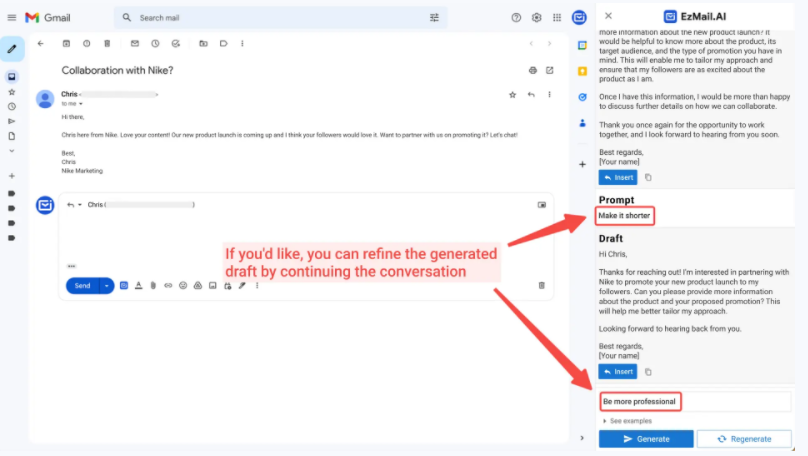
Screenshot archived from the listing page, for preview only.











