GeniusReview
AI tool for 360-degree performance reviewsBuild performance reviews faster with AI
Highlights
What you can do with it
- Writing peer and upward reviews for a colleague
- Drafting a self-evaluation for a cycle
- Preparing manager feedback with structure
How to use it
- 1 Open the GeniusReview site
- 2 Start the free trial
- 3 Select the role and the questions to answer
- 4 Generate the answers and skill rankings
- 5 Edit the feedback and export it for submission
Who it is for
Pros
- Free to try before committing
- Saves drafting time on repetitive reviews
- Structured output with skill rankings
Limitations
- Free trial limits how much you can generate
- Output needs editing to sound human and fair
- May not match your internal review template
What GeniusReview is
GeniusReview is a 360-degree AI performance evaluation tool. You answer customized evaluation questions and it produces responses based on the employee role, along with skill rankings and generated feedback. The site says it saves a lot of time when you need to complete performance reviews, and you can try it for free. It is aimed at managers, HR staff, and teams that run regular review cycles and want a starting draft instead of a blank page. Because it generates text from your inputs, read the output and adjust it to your company standards before you submit anything.
What you can do with it
- Answer customized questions for a 360-degree review
- Generate role-based responses and feedback text
- Produce skill rankings across the review
- Draft self-evaluations as well as manager reviews
Who it is for
- Managers writing reviews for their team
- HR professionals running review cycles
- Employees preparing self-evaluations
What to watch out for
The free trial limits how much you can generate, so test with one review before a full cycle. Output can read as generic, and performance feedback carries real weight for people's careers, so edit carefully and keep it fair and specific. It may not line up with your internal template, so expect to reformat the text before it goes into your HR system. Behavior may vary across browsers and devices, so test before production use and consult the help docs if errors appear. Features and interface details may change between versions, so review the latest notes on the page before you start. Name and archive exported files consistently so you can find and reuse them, and keep a backup copy of key data.
FAQ
What is GeniusReview?
It is a 360-degree AI performance evaluation tool that generates answers, skill rankings, and feedback.
Is it free?
You can try it for free, according to the site.
Who is it for?
Managers, HR staff, and teams that run regular performance review cycles.
Can I edit the output?
Yes, the generated feedback should be reviewed and adjusted before you submit it.
Why it is free
What the official page says: for free
Free limits, trial length and features are decided by the official site and can change at any time.
Product preview
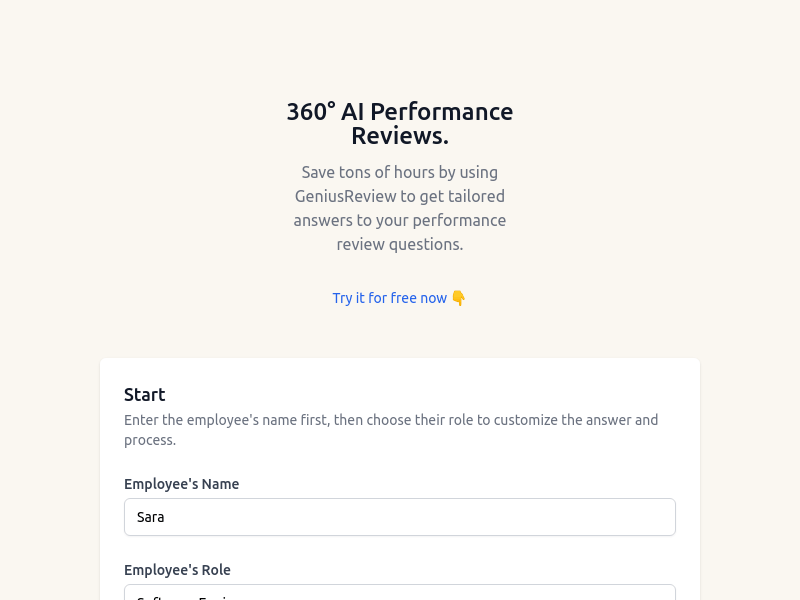
Screenshot archived from the listing page, for preview only.