RevenuePage
Builds verified Stripe revenue pages to share MRR and ARRConnect Stripe, publish a live revenue page, keep control of who sees it
Highlights
What you can do with it
- A startup publishes MRR and ARR to build trust with investors
- An e-commerce company shows growth on its own branded domain
- A founder restricts a revenue page to specific emails and adds a booking link
How to use it
- 1 Open RevenuePage and click Create revenue page
- 2 Connect your Stripe account so data verifies and syncs
- 3 Customize the domain, colors, and logo
- 4 Set access to public, private, or specific audiences
- 5 Add booking links or media, then check and publish the page
Who it is for
Pros
- Free version includes 2 revenue pages
- Automatic Stripe sync removes manual updates
- Fine-grained privacy control over who sees the numbers
Limitations
- It depends on Stripe, so other payment providers may not be supported
- The free plan caps you at 2 pages
- Public revenue pages expose business data, so set access carefully
What RevenuePage is
RevenuePage is a tool that creates verified revenue pages for businesses. You connect your Stripe account, and it syncs revenue data such as MRR, ARR, and growth rate in real time, without manual updates or screenshots. You can then share that page while controlling who sees it, from fully public to restricted to specific email domains. It supports custom domains, colors, and logos, and lets you add booking links, video messages, and documents. The free version includes 2 revenue pages, and the professional version costs $75 per year for 5 pages and advanced features.
What you can do with it
- Publish a live revenue page backed by verified Stripe data.
- Share MRR, ARR, and growth with the audience you choose.
- Brand the page with your own domain, colors, and logo.
- Add Cal.com or Calendly booking, video messages, and resource links.
Who it is for
- Startups that want to show traction to investors and the community.
- Entrepreneurs building a public brand around real numbers.
- Companies that need to share revenue with customers, suppliers, or partners.
What to watch out for
The tool depends on Stripe, so if you take payments elsewhere, the automatic verification may not cover you. Publishing revenue is a real business decision: a public page exposes your figures, so set access carefully and think about what competitors or customers might see. The free plan caps you at 2 pages, and pricing or Stripe integration details can change, so confirm the current setup before you rely on it for fundraising. Run one full task end to end first, then expand once you are comfortable with the workflow and the result quality.
FAQ
Is RevenuePage free?
There is a free version that includes 2 revenue pages. The professional version is $75 per year and allows 5 pages with advanced features.
How does it get my numbers?
You connect your Stripe account, and the system verifies and syncs revenue data such as MRR, ARR, and growth automatically.
Can I control who sees the page?
Yes. You can make it public, restrict it to specific email domains, or keep it fully private.
What should I keep in mind?
It relies on Stripe, and publishing revenue data exposes business figures, so review your access settings before sharing.
Why it is free
What the official page says: free version
Free limits, trial length and features are decided by the official site and can change at any time.
Product preview
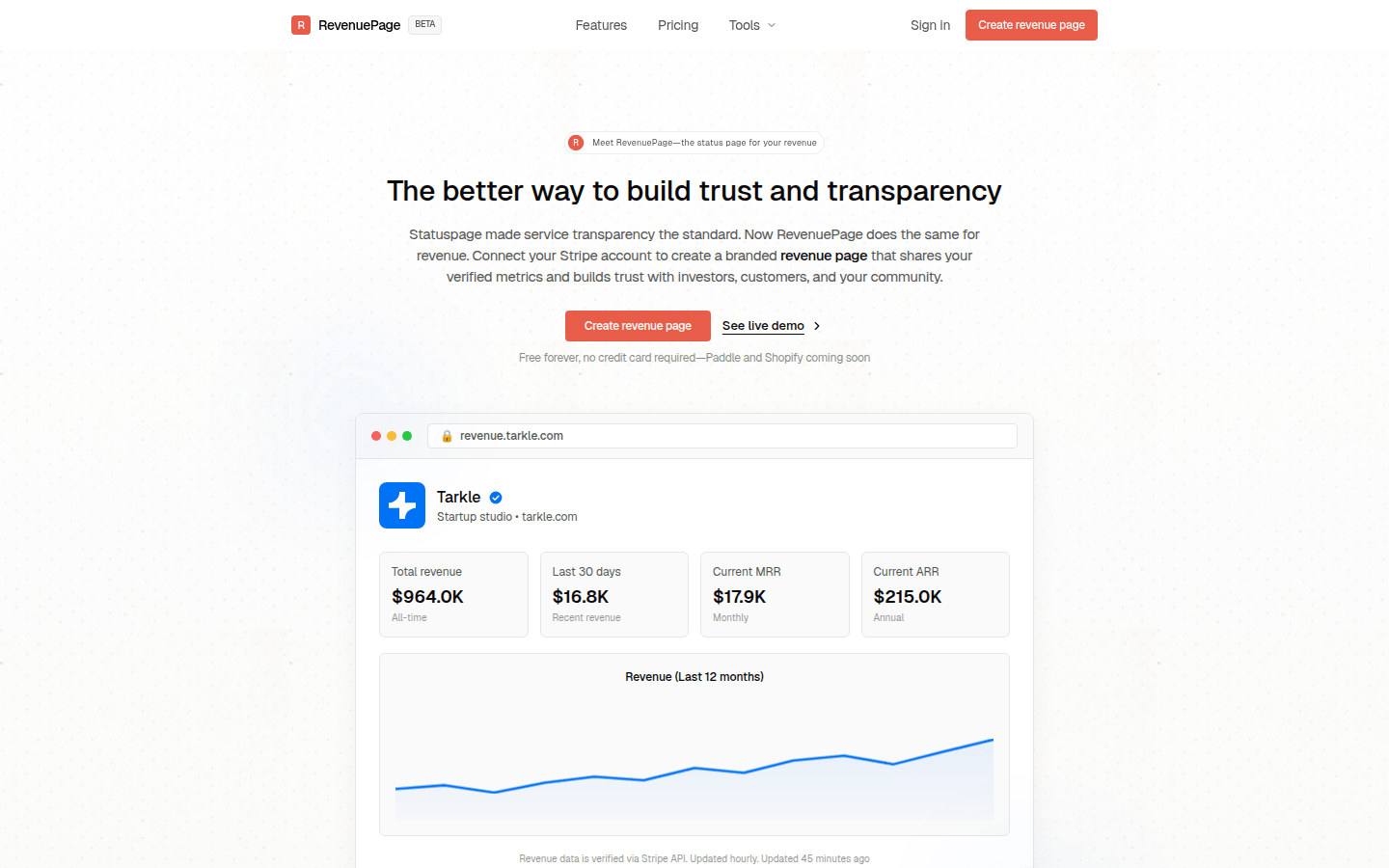
Screenshot archived from the listing page, for preview only.