
Supermemory MCP
Portable personal memory layer for AI clientsYour notes and memories, available in every client
Highlights
What you can do with it
- Students recording class notes and learning points for later review
- Professionals tracking project progress and personal tasks
- Writers collecting inspiration and recording creative thoughts
How to use it
- 1 Open the Supermemory MCP site and create a personal memory account.
- 2 Pick and install the client you want to use.
- 3 Add your first memory through the interface.
- 4 Turn on auto-refresh so stored information stays current.
- 5 Reach the same memories from any client you have connected.
Who it is for
Pros
- Works across different clients instead of locking you to one app
- Private links give each memory its own address
- Free to use, with no payment step to start
Limitations
- Being free to use now does not guarantee the pricing stays that way
- Depends on the clients you connect, so setup varies by environment
- Memory quality depends on what you actually save and how you label it
- Not a substitute for a real backup of important files
What Supermemory MCP is
Supermemory MCP is a personal, general-purpose memory platform. You save memories to it and then reach them again later from different clients, which is the point of the design: the memory layer is not trapped inside one app. The design assumes you move between tools, so the memory follows you rather than sitting wherever you happened to write it down. Creating an entry is meant to be simple, and each memory gets its own unique URL so you can control who sees it. An auto-refresh option keeps stored information current instead of going stale. The interface is built to be straightforward so you can start adding material within a few minutes. The service is free to use, so there is no payment step between you and your first saved memory.
What you can do with it
- Create and store memories without a complicated setup
- Reach the same memory from several different clients
- Share or revisit entries through private, unique links
- Keep stored information fresh with auto-refresh
Who it is for
- Students who want class notes and learning points in one place
- Professionals tracking project progress and personal tasks
- Writers and researchers collecting material over weeks and months
- Teams that want a shared memory layer across their tools
What to watch out for
Because the product is free to use right now, the terms and any usage limits can change later, so do not treat it as your only copy of anything important. If the service changes or disappears, whatever you have exported is the only thing you keep. It also depends on the clients you connect, which means setup effort varies a lot depending on your environment. A memory tool only works as well as the material you put into it, and searching later is easier if you save things in a consistent way. For confidential material, remember that a shareable link is still a link, so keep it private.
FAQ
What does the MCP part mean for me?
It means the memory layer is designed to be reached by client software that speaks that protocol, so you can connect it to the tools you already use rather than a single website.
Is Supermemory MCP free?
The service is described as free to use. Limits and terms can still change, so check the site before you rely on it for long-term storage.
How private are my memories?
Each memory has its own unique URL, which is the privacy mechanism the product describes. Treat the link like a password and do not share it if the content is sensitive.
Can I use it on more than one device?
Yes, multi-client support is one of the listed features, so the same memory can be reached from different clients and setups.
Why it is free
What the official page says: free to use
Free limits, trial length and features are decided by the official site and can change at any time.
Product preview
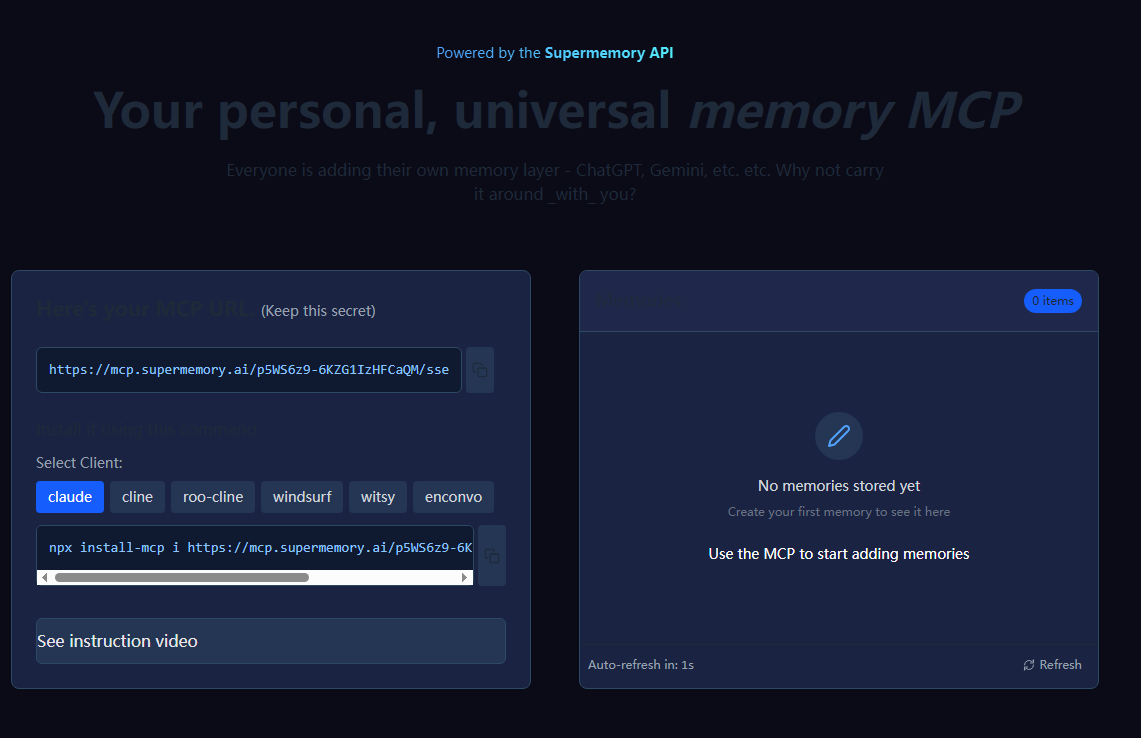
Screenshot archived from the listing page, for preview only.











