Talent - Immersive & AI Translator
Browser extension that translates selected text across several enginesSelect text, get translations, and hear them read aloud.
Highlights
What you can do with it
- Reading a page in a language you are still learning
- Comparing translations from different engines for the same sentence
- Translating text inside screenshots and images
- Using example sentences and pronunciation as an English study aid
How to use it
- 1 Install the extension from the Chrome Web Store.
- 2 Open a webpage and select the text you want translated.
- 3 Read the translation and the extra detail such as pronunciation and examples.
- 4 Turn on automatic reading if you want the result spoken aloud.
- 5 Use screenshot translation when the text is part of an image.
Who it is for
Pros
- Several translation sources behind a single text selection
- Free to use according to the developer
- Reading support helps with listening and pronunciation practice
- Screenshot translation covers text you cannot select
Limitations
- The free status can change at any time
- Accuracy depends on the upstream services, and they may disagree
- A browser extension can break when a site redesigns its layout
- Long pages and heavy screenshots can slow the reading experience
What Talent - Immersive & AI Translator is
Talent is a browser extension for Chrome that turns selected webpage text into a translation. Instead of relying on one engine, it aggregates several sources including Google, Baidu, DeepL, and OpenAI, so you can see more than one take on the same sentence. Alongside the translation it shows phrases, pronunciations, and example sentences, and it can read the result aloud with customisable reading settings. Screenshot translation handles text that cannot be selected, such as words inside an image. The developer states that the extension is completely free to use, and everything happens on the page you are already reading.
What you can do with it
- Select text on any page and translate it into the language you want
- Compare results from several translation engines in one panel
- Translate text captured from a screenshot
- Listen to the translation read automatically, with settings you can adjust
- Use example sentences and pronunciation as an English learning aid
Who it is for
- People who read pages in more than one language during the day
- Language learners who want to hear a word and see it in context
- Anyone who meets text locked inside images or graphics
- Users who like checking a translation against a second engine before trusting it
What to watch out for
Translation quality is not guaranteed, since the extension leans on outside services that may disagree with each other or return different wording for the same input. Being a browser extension also means it inherits the fragility of the web: a site that changes its layout can break text selection or screenshot capture until the extension is updated. The free status is the developer's current claim rather than a promise, so it can change. If you use it for study or work, treat the output as a reference and confirm important wording yourself.
FAQ
Which translation engines does it use?
The extension aggregates several sources including Google, Baidu, DeepL, and OpenAI.
Is it free?
The developer describes Talent as completely free to use.
Can it translate images?
Yes, it offers screenshot translation for text that sits inside an image.
Does it work on any site?
It runs as a page extension, but layout changes on a site can affect how text selection and screenshot capture behave.
Why it is free
What the official page says: completely freefree to use
Free limits, trial length and features are decided by the official site and can change at any time.
Product preview
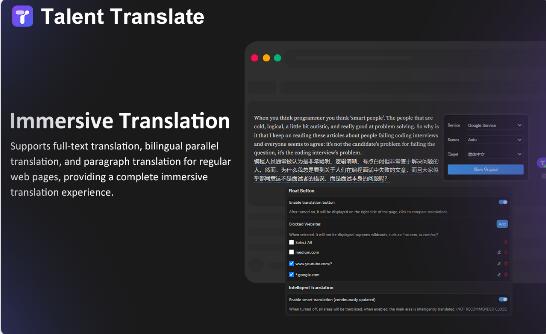
Screenshot archived from the listing page, for preview only.