WAChecker
Free Chrome extension to batch check WhatsApp numbersBatch check WhatsApp numbers for free
Highlights
What you can do with it
- Cross-border e-commerce teams cleaning a large phone list before a WhatsApp campaign
- Sales teams checking business cards collected at trade shows
- Agencies that maintain client number lists and need a repeatable cleanup step
How to use it
- 1 Install the WAChecker extension in Chrome and open WhatsApp Web while logged in
- 2 Click the extension icon in the toolbar to open the dashboard
- 3 Paste numbers or import an Excel file, one number per line
- 4 Press Start Checking and watch the progress in real time
- 5 Filter by status, tick the valid numbers, and export them to Excel
Who it is for
Pros
- Free to use, with no paid API and no subscription needed to start
- Runs locally in the browser, which keeps sensitive lists off third-party servers
- Excel import and export fit the way marketing teams already store contacts
- Duplicate detection and status filters cut down manual sorting
Limitations
- It depends on a logged-in WhatsApp Web session, so checking stops if you log out or if WhatsApp changes the web client
- Checking pace is limited by configurable intervals, so very large lists take time
- The free feature set belongs to the WASender ecosystem and can change
- WhatsApp terms and anti-spam rules still apply, and bulk outreach to unverified numbers can put an account at risk
What WAChecker is
WAChecker is a free Chrome extension for WhatsApp marketing and contact management. It uses the WhatsApp Web session already open in your browser to check, in bulk, whether phone numbers belong to registered WhatsApp accounts. It does not call any official paid API, and it needs no developer approval or business verification: you install it, open WhatsApp Web, and start checking. Because it works on the session you are already logged into, there is nothing to configure on the WhatsApp side, which is why teams use it instead of paying for API access. Everything, including the results, stays in local browser storage.
What you can do with it
- Import number lists from Excel or paste them directly, one per line
- Check hundreds or thousands of numbers in one run and follow the progress live
- Sort results into Registered, Not Found, and Incomplete, then filter by status
- Spot duplicate numbers before they are checked twice
- Tune the checking interval to match your account activity and risk tolerance
- Export the numbers you want to keep to Excel for campaigns or a CRM import
Who it is for
- Digital marketers and agencies that need clean lists before a WhatsApp campaign
- E-commerce and cross-border sellers holding large customer phone databases
- Sales and business development teams that stay in daily contact with prospects
- Startups and small teams that want list cleaning without buying a tool
- Data and CRM administrators who tidy number lists on a regular schedule
What to watch out for
The extension depends on a logged-in WhatsApp Web session, so if you sign out or WhatsApp changes the web client, checking can stop without warning. Very large lists take time because the interval is configurable and the tool works one number at a time. The free feature set and any future limits belong to the WASender ecosystem and can change, so do not build a critical process on the assumption that it stays free forever. Sending messages still follows WhatsApp's own rules, and bulk outreach to unverified numbers can put an account at risk, so treat a checked number as a clean contact rather than permission to message it.
FAQ
Is WAChecker free?
Yes. The extension is described as free and it does not call any paid WhatsApp API.
Does it upload my number list?
No. Checks and results are processed and stored locally inside the browser extension.
What results does it show?
Three states for each number: Registered, Not Found, and Incomplete.
Can I export the good numbers?
Yes, filtered valid numbers can be exported as an Excel file.
Why it is free
What the official page says: 免费
Free limits, trial length and features are decided by the official site and can change at any time.
Product preview
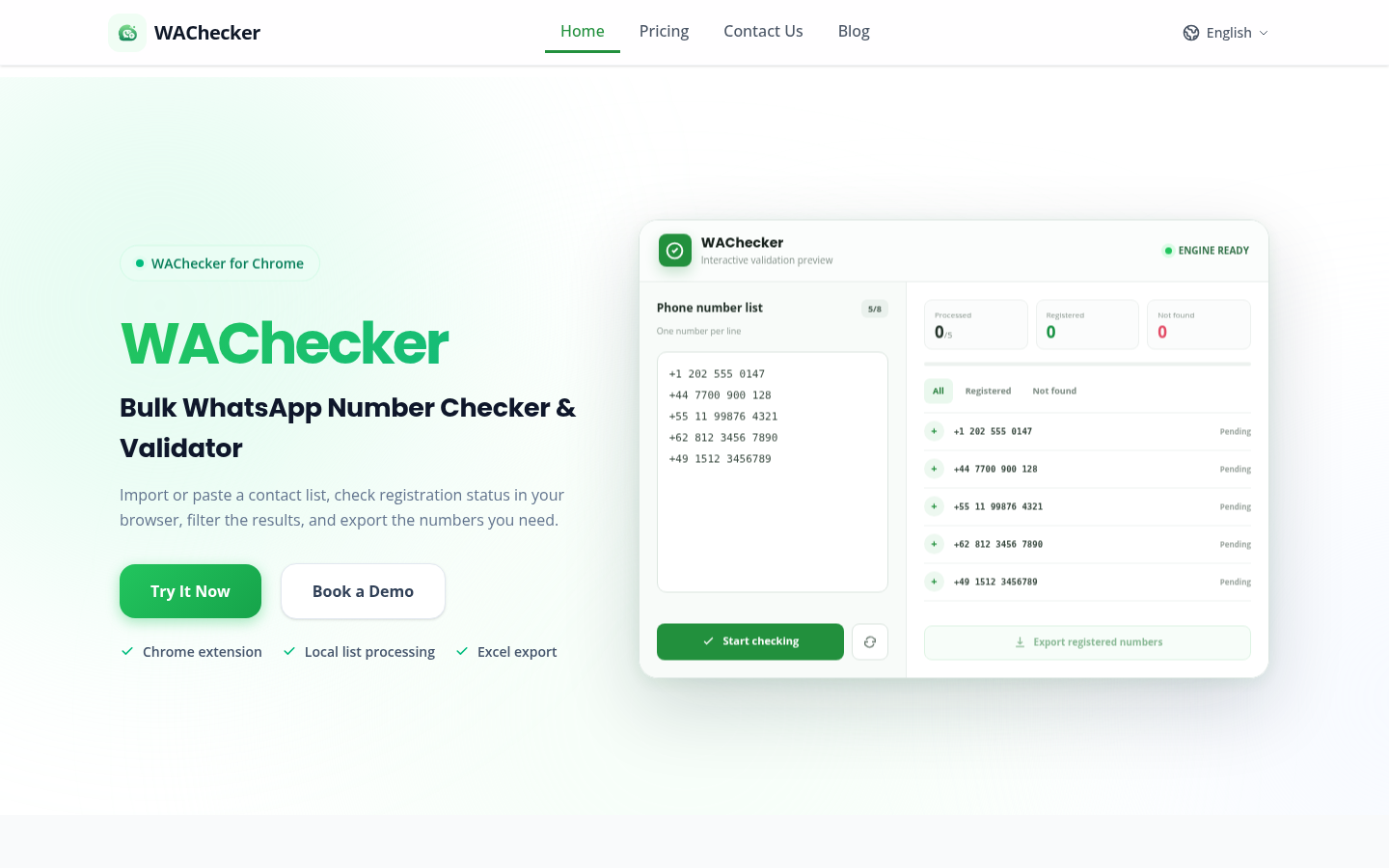
Screenshot archived from the listing page, for preview only.