Email Tracker
Free Gmail email trackingSee opens and clicks in Gmail
Highlights
What you can do with it
- A sales rep knows the moment a prospect opens an email and follows up
- A marketer analyzes click data to improve email content
- An individual checks whether an important message was read
How to use it
- 1 Install the Email Tracker extension in Chrome
- 2 Log in to Gmail and enable the tracker on the compose screen
- 3 Send your email as usual
- 4 Open the plugin to see open status and click data
Who it is for
Pros
- Free to use with Gmail
- Open and click data arrive in real time
- Tracking visibility is up to you
Limitations
- Tracking can be blocked by recipients, so opens may be missed
- Tracking email opens has privacy and consent implications that vary by region; responsibility sits with the sender
- It works with Gmail in Chrome, so other mail clients are out of scope
What Email Tracker is
Email Tracker is a free Gmail plugin that reports on what happens after you press send. It notifies you in real time when an email is opened, breaks down open counts and open times, and tracks clicks on links inside the message. The stated purpose is improving response rates and sales revenue by letting you follow up at the right moment rather than guessing. You can choose whether the tracking is visible or invisible, and the listing mentions data privacy protection for users. Setup is a Chrome extension that hooks into the Gmail compose screen, so nothing about how you write an email changes.
What you can do with it
- Get a real-time notification when an email is opened
- See how many times an email was opened and when
- Track clicks on links inside the email body
- Choose between visible and invisible tracking
- Time follow-ups based on actual engagement
Who it is for
The examples are a sales representative who wants to know the moment a prospect opens an email so they can follow up immediately, a marketing professional analyzing click data to improve email content and strategy, and an individual tracking an important email to make sure it gets a response. That covers sales, marketing, and everyday personal use. If your work depends on knowing whether a message landed, this is the audience the tool is built for.
What to watch out for
Open tracking relies on the recipient's mail client loading the tracking element, and plenty of clients, privacy tools, and settings block that, so a missing open notification does not prove the email was ignored. Treat the numbers as a tendency rather than a fact. There is also a compliance dimension: tracking email opens carries privacy and consent implications that differ by region and by organization, and the responsibility for using it appropriately sits with the sender, so check the rules that apply to you. Scope is limited to Gmail in Chrome, and the free tier's limits are not itemized.
FAQ
Is Email Tracker free?
Yes, the listing describes it as a free Gmail email tracking tool.
What data do I get?
Open notifications, open counts and times, and click data for links in the email.
Can the recipient see the tracking?
The feature list includes choosing visible or invisible tracking.
Which browsers and mail services?
It installs as a Chrome extension and works with Gmail.
Why it is free
What the official page says: 免费
Free limits, trial length and features are decided by the official site and can change at any time.
Product preview
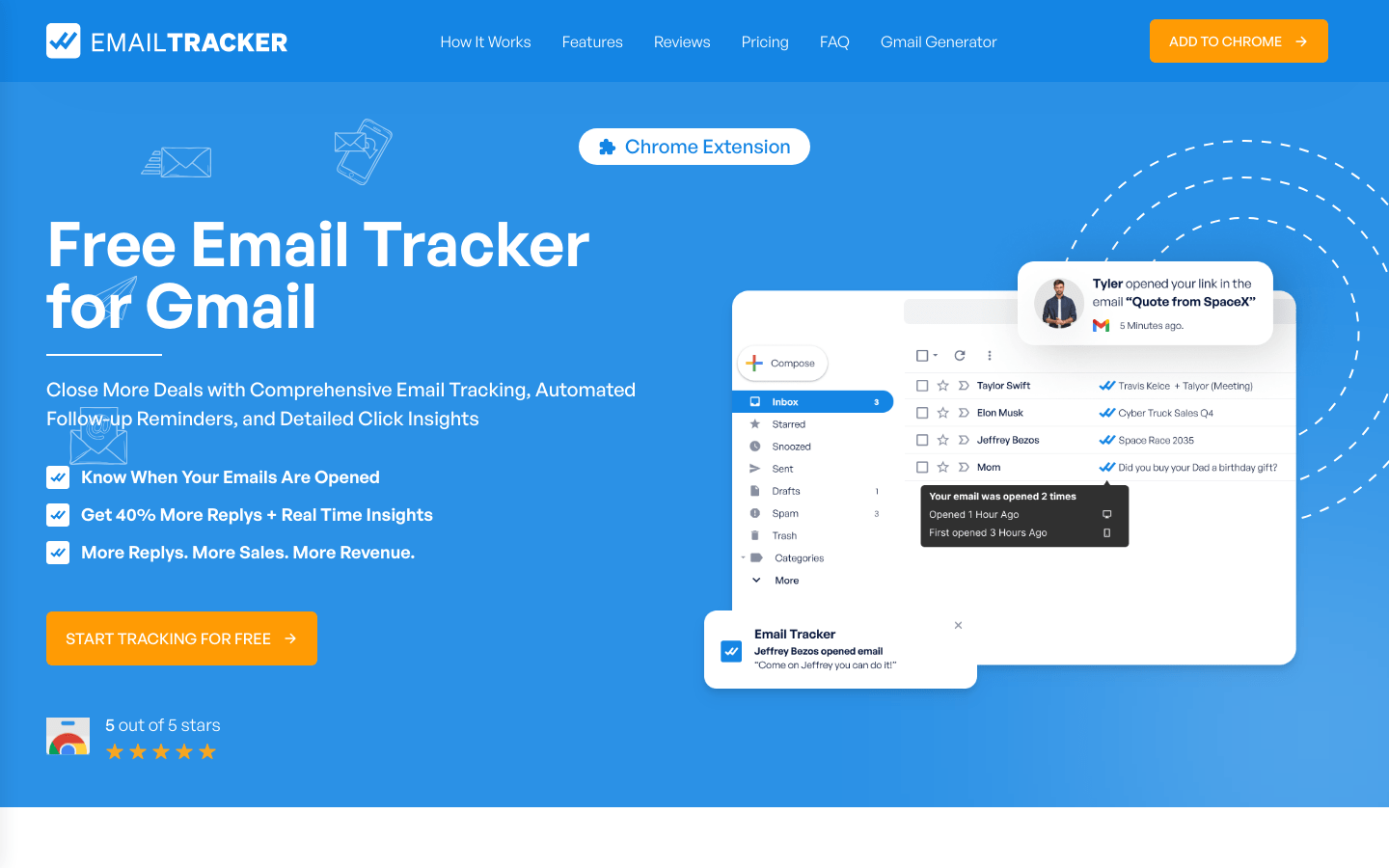
Screenshot archived from the listing page, for preview only.