UpscaleAI
AI image and video super-resolution tool that enlarges and restores media up to 8K.Upscale photos to 8K and video to 4K with AI detail reconstruction.
Highlights
What you can do with it
- Photographers upscale low-resolution shots to 8K for large exhibition prints.
- Video creators turn 720p game or family footage into clean 4K guides and keepsakes.
- Everyday users repair scratched, faded scans and bring old photos back to life.
- Designers sharpen anime frames, manga panels, and AI art to print-ready quality.
How to use it
- 1 Open the UpscaleAI website in your browser.
- 2 Click 'Start for Free' to begin without paying.
- 3 Choose the file type to process, such as a photo or a video.
- 4 Upload the image or video you want to enhance.
- 5 Let the site pick the appropriate Topaz model; no manual settings are required.
- 6 Wait for processing to finish, then preview the result.
- 7 If you are happy, click download to save the enhanced file.
Who it is for
Pros
- A free start is available, so you can test quality before committing.
- Automatic model selection removes the guesswork of manual tuning.
- Handles both still images and video in one place, up to 8K and 4K.
- Detail reconstruction keeps portraits and artwork looking natural.
Limitations
- Free access may be limited, and the free rules or quotas can change over time.
- Heavy or commercial use may require a paid plan beyond the free start.
- Results depend on the source file; very low-quality input has limits.
- Large 8K or long video jobs can take time to process.
What UpscaleAI is
UpscaleAI is an online tool that uses AI to raise the resolution and overall clarity of images and videos. Instead of simply stretching pixels, it reconstructs real detail so portraits, product shots, and artwork stay natural at larger sizes. It can enlarge photos from 2x up to 8x, reaching 8K resolution, and it can lift 720p video to clear 4K while smoothing motion up to 60fps. The site states that you can start using it for free, and there is also a free trial, with paid options likely available for heavier or professional use. It is built for photographers, designers, video creators, and everyday users who want cleaner, sharper media without installing complex software or tuning settings by hand. When you upload a file, it automatically selects the appropriate Topaz model, which removes most of the guesswork from enhancement.
What you can do with it
- Enlarge photos up to 8x and 8K for large prints, displays, and client work.
- Enhance 720p videos to 4K and smooth motion to 60fps for big screens.
- Restore damaged or faded old photos, removing scratches and noise, with optional color.
- Sharpen faces in portraits and group photos while keeping features realistic.
- Clean up text in screenshots and scanned pages so small letters stay legible.
- Boost anime frames, manga panels, and AI art to print-ready clarity.
Who it is for
- Photographers who need high-resolution output from smaller or softer source files.
- Designers and video creators working with low-resolution or noisy material.
- Everyday users who want to repair old family photos or clean up scanned documents.
- Anime and illustration fans who want sharper frames and cleaner edges.
What to watch out for
The free start may come with limits, and the free rules or daily quotas can change over time, so check the current terms before depending on it for important projects. Heavy batches, long videos, or commercial work may push you into a paid plan, and costs can rise with volume. Results still depend on the source: extremely small or badly damaged files have a ceiling on how much detail can be rebuilt. Large 8K images and long 4K video jobs can also take noticeable time to process, so plan ahead for big exports and keep expectations realistic on very poor input.
FAQ
Is UpscaleAI free to use?
The page says you can start using it for free, and there is a free trial. Some advanced or high-volume use may require payment.
What resolutions can it reach?
Images can be enlarged up to 8x to 8K, and videos can be enhanced from 720p up to 4K at up to 60fps.
Do I need to adjust settings myself?
No. It automatically selects the appropriate Topaz model for the file you upload.
What can it fix besides resolution?
It can deblur, denoise, restore old photos, sharpen faces, clean scanned text, and enhance anime frames.
Why it is free
What the official page says: for freefree trial
Free limits, trial length and features are decided by the official site and can change at any time.
Product preview
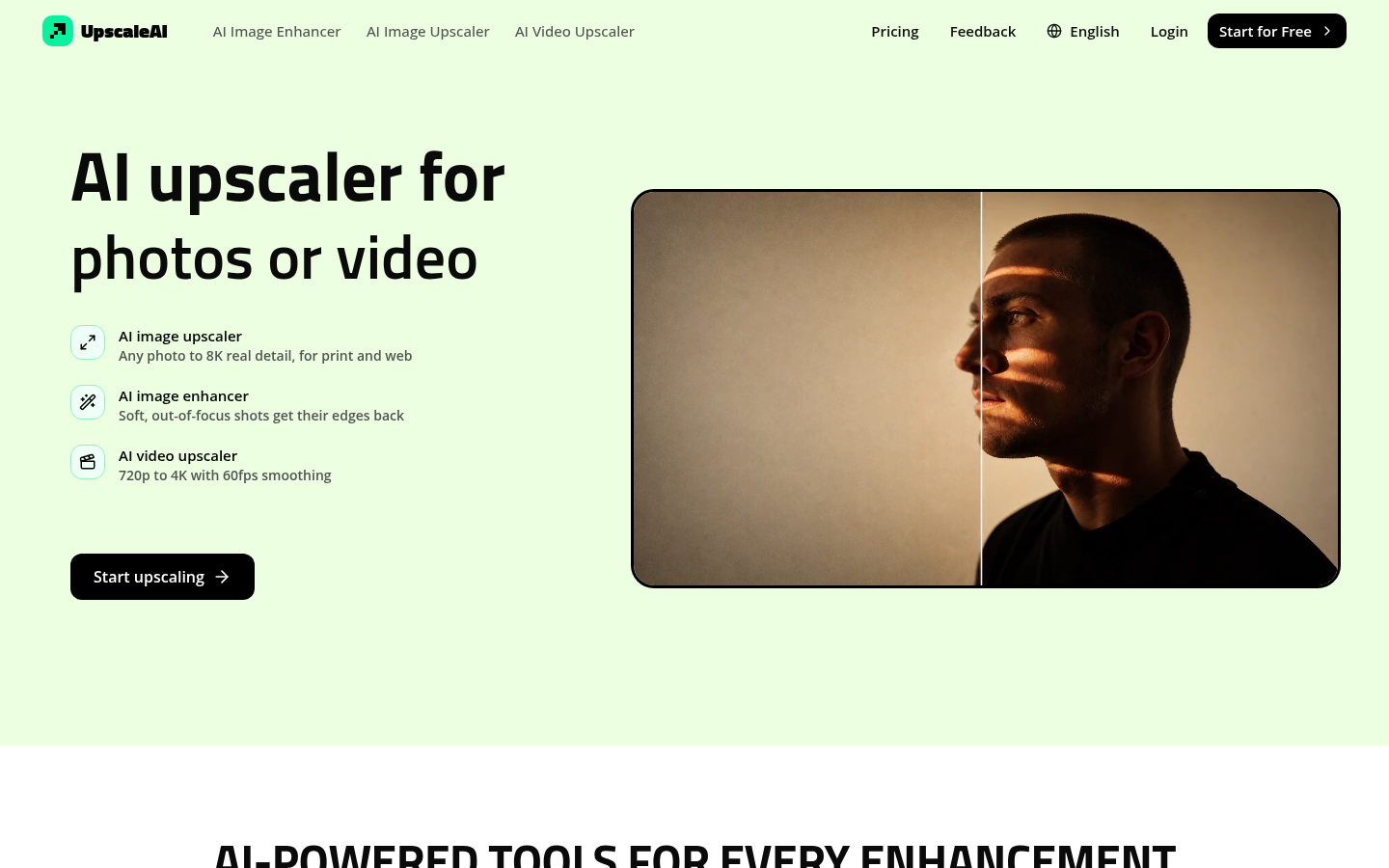
Screenshot archived from the listing page, for preview only.