CoolMindMaps
Create, search, and share mind maps onlineMind maps for ideas, study, and team planning
Highlights
What you can do with it
- Outlining an essay or project before writing
- Mapping a brainstorming session with a team
- Browsing existing maps for inspiration
How to use it
- 1 Open coolmindmaps.com and start the free trial
- 2 Create a new map or search existing ones
- 3 Add branches and structure your ideas
- 4 Share or collaborate when the map is ready
Who it is for
Pros
- Free trial to try the editor
- Search gives you a starting point instead of a blank page
- Collaboration is built in
Limitations
- Full use requires a paid subscription
- Free trial terms can change
- Good maps still need a clear idea of your structure
What CoolMindMaps is
CoolMindMaps is an online platform for creating and searching mind maps. You can build and edit your own diagrams in the browser, and you can also search through maps that other users have made, which is useful when you want a structure to react to rather than a blank canvas. The site positions it for both individual and team use, with a free trial available and paid subscriptions for people who need more.
What you can do with it
- Create and edit a mind map in the browser
- Search and browse maps created by other users
- Share a map and collaborate on it with other people
- Use the free trial before choosing a subscription
Who it is for
- Students organising notes and revision material
- Teams capturing a brainstorming session as it happens
- Anyone who understands a topic faster as a diagram than as a list
What to watch out for
A mind map is only as clear as the idea behind it, so spend a minute on structure before you start dragging branches around. The free trial is a window to test the editor, not a permanent tier, and paid subscriptions unlock fuller use, so check current pricing before a team commits. Trial terms can change, and if you are putting sensitive planning material into a shared map, look at how sharing and access are controlled before you invite people in. Run one full task end to end first, then expand once you are comfortable with the workflow and the result quality. Behavior may vary across browsers and devices, so test before production use and consult the help docs if errors appear.
FAQ
Can I try it for free?
Yes, the site offers a free trial alongside paid subscriptions.
Can I see maps other people made?
Yes, there is a search function for browsing maps created by others.
Is it for teams?
The pricing covers both individual and team needs, and maps can be shared and collaborated on.
Why it is free
What the official page says: free trial
Free limits, trial length and features are decided by the official site and can change at any time.
Product preview
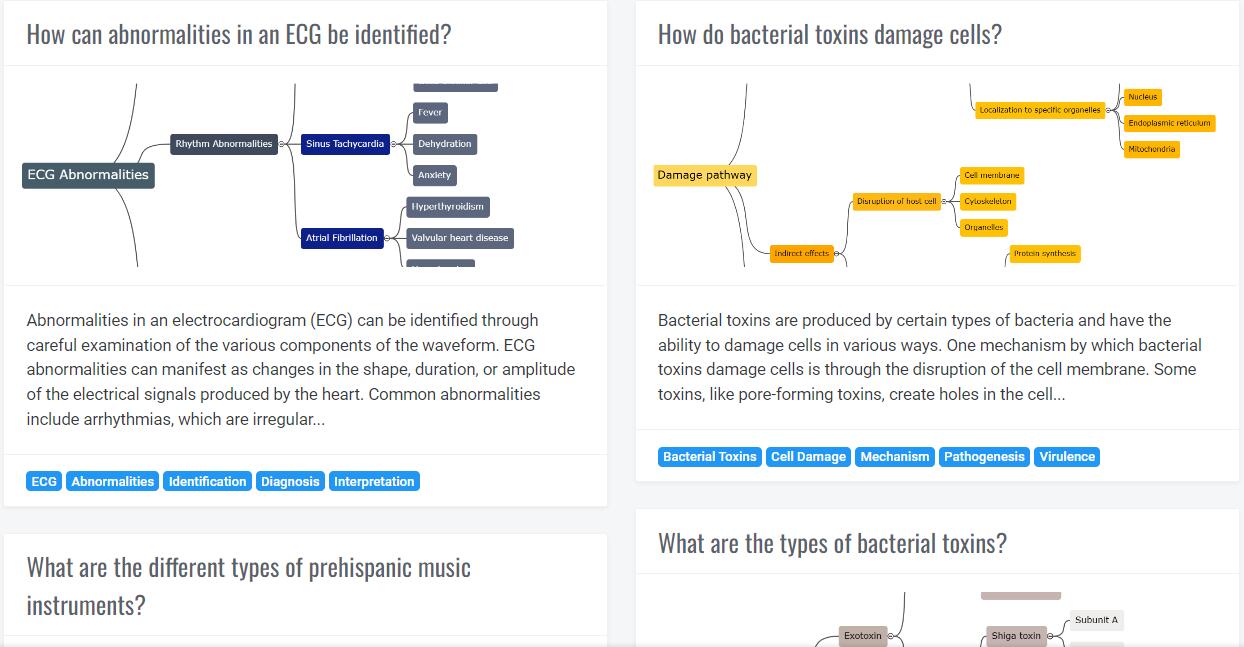
Screenshot archived from the listing page, for preview only.