GitHub Readme Generator
GitHub README builderBuild a GitHub profile README fast
Highlights
What you can do with it
- Build a profile README that shows your projects and skills.
- Create an attractive page as a new GitHub user.
- Draft a project README with badges and contribution info.
How to use it
- 1 Visit the GitHub Readme Generator website.
- 2 Choose badges and layout options you like.
- 3 Insert badges and customize colors and styles.
- 4 Adjust the layout and check the live preview.
- 5 Copy the result and paste it into your GitHub README.
Who it is for
Pros
- Free and quick compared with writing Markdown by hand.
- Badges and layout options cover common needs.
- Live preview helps you see the result as you build.
Limitations
- The domain is brand new and the site showed an error, so access may be unreliable.
- Free tools can change, and features may be limited.
- Generated READMEs still need your own review and edits.
What GitHub Readme Generator is
GitHub Readme Generator is a free online tool for creating a personalized README for your GitHub profile. Rather than writing Markdown by hand, you choose badges, layout options, colors, and styles, and the tool assembles a README you can copy straight into your profile or a project. It supports inserting and copying styled badges, including social media and programming language badges, and it offers one-click copying of image links so you can customize further. There is a live preview, which gives a what-you-see-is-what-you-get feel as you adjust things. It is aimed at developers and open-source contributors who want to present their projects, skills, and achievements clearly on GitHub. One caution: the domain appears brand new, and the site was returning an error status when this listing was recorded, so availability can vary.
What you can do with it
- Generate a profile README without writing Markdown from scratch.
- Add styled badges for skills, languages, and social media.
- Customize colors, styles, and layout options like borders.
- Preview the result live, then copy it into GitHub.
Who it is for
- Developers who want to showcase projects and skills on GitHub.
- New GitHub users building an attractive profile page.
- Open-source maintainers drafting project READMEs.
What to watch out for
Availability is the main concern. The domain appears brand new and the site was returning an error status at last check, so confirm the current state before you depend on it. Even when it is working, treat the output as a starting point: generated READMEs still need your own review, and you will likely want to edit the text so it reflects your real projects and voice. Free tools can change or gain limits over time, so keep a local copy of your README once you are happy with it. If the site is down, you can still write a README in Markdown by hand, so do not let the tool become a single point of failure for your profile. Double-check that any badges you add point to links that are correct and current.
FAQ
Is it free?
Yes, the tool is described as free and easy to use for generating GitHub profile READMEs.
What can I customize?
You can customize badges, colors, styles, and layout options, with a live preview.
Where do I put the result?
You copy the generated README and paste it into your GitHub profile or project README file.
Why it is free
What the official page says: 免费
Free limits, trial length and features are decided by the official site and can change at any time.
Product preview
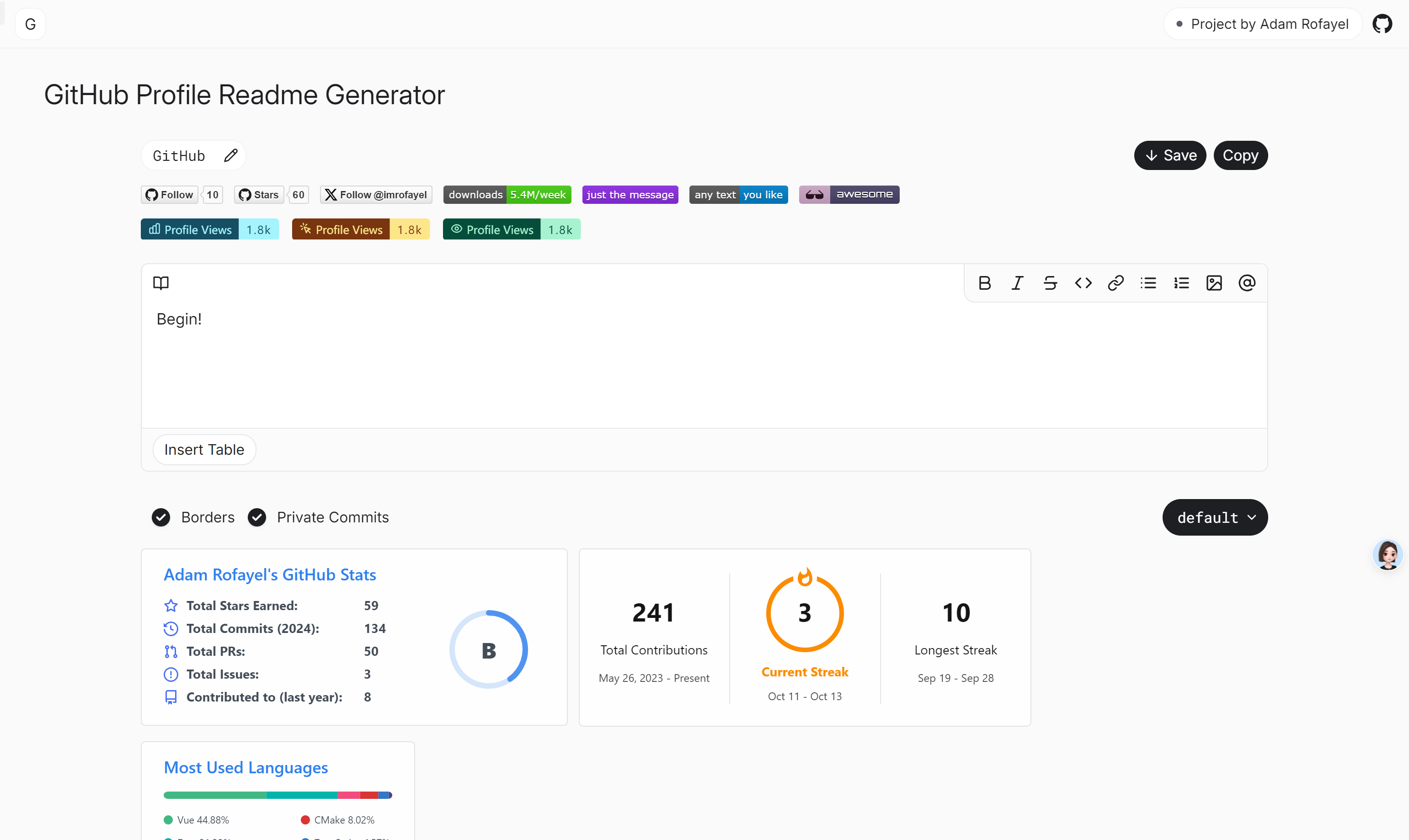
Screenshot archived from the listing page, for preview only.